Google Home: smart home app
Google Home is a lifestyle app by Google LLC that lets you set up and control compatible Nest, Chromecast, and Google Home devices.
Google Home is a free lifestyle app by Google LLC for setting up and managing compatible Nest, Chromecast, and Google Home devices. It supports voice control through Gemini for Home, camera live view, and event history so users can check on their home at any time. The app needs Android 8.0 or higher, is about 83 MB to download, and offers in-app purchases.
Download Google HomeScreenshots
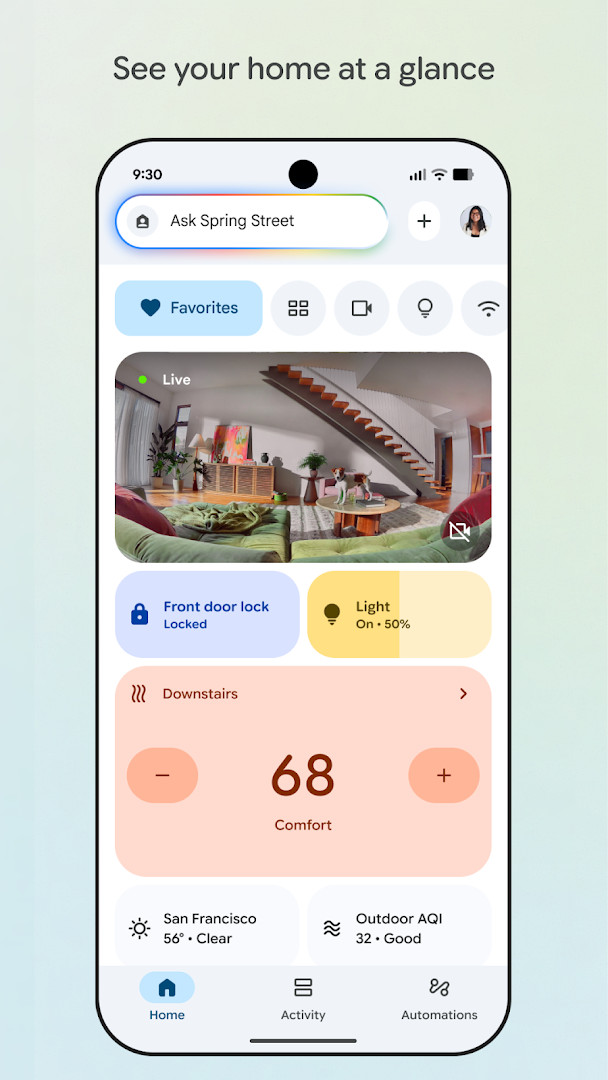
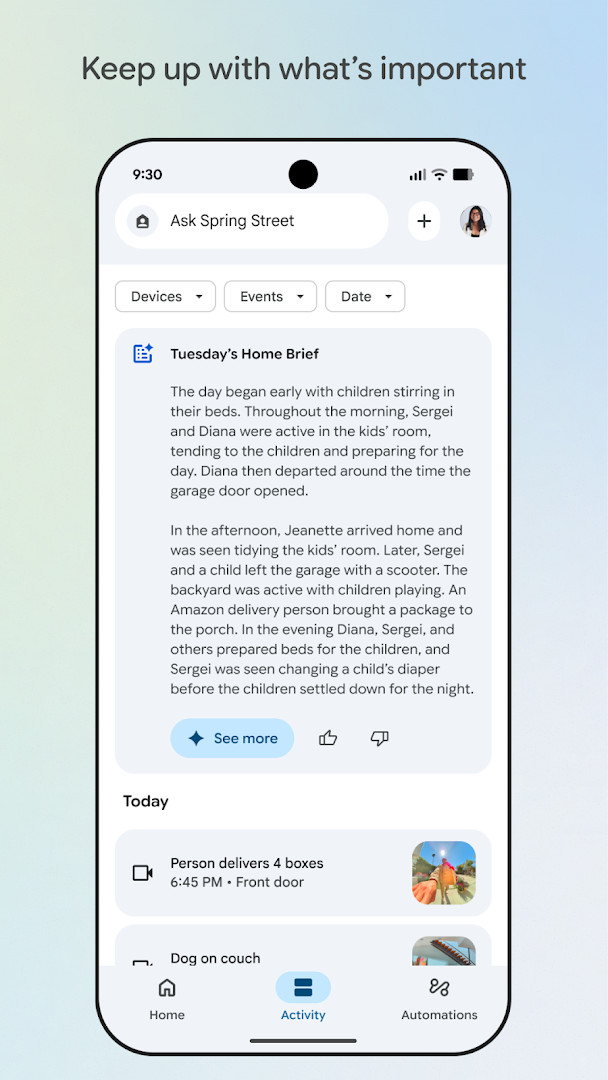
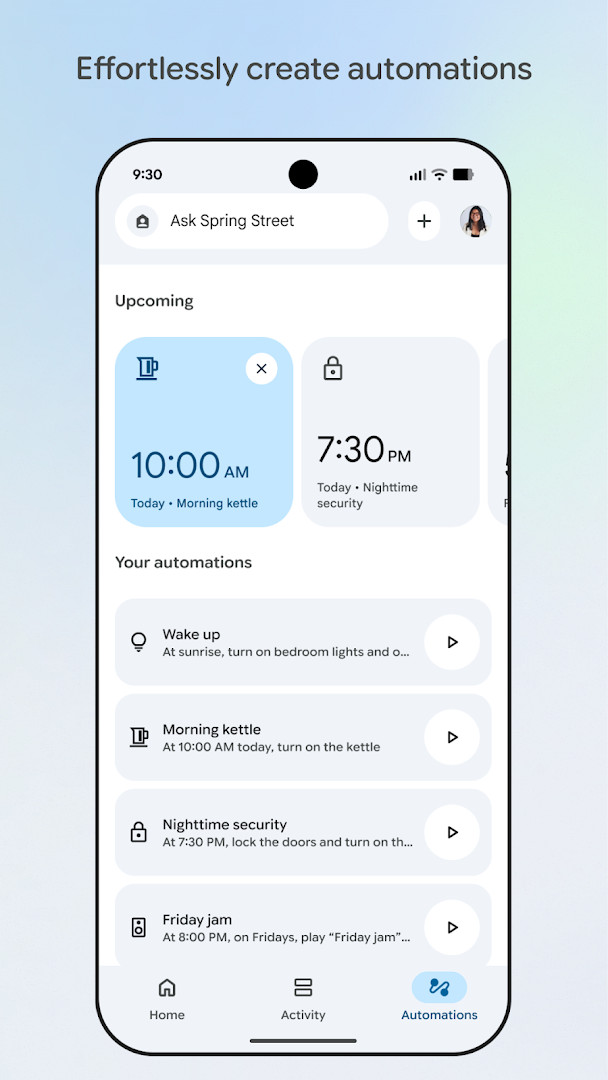
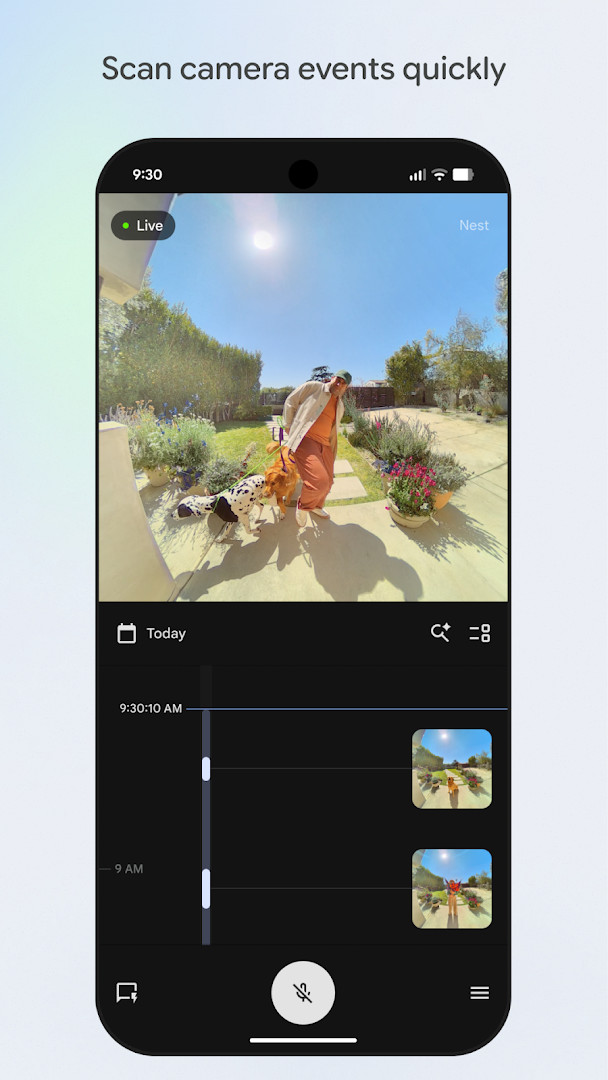
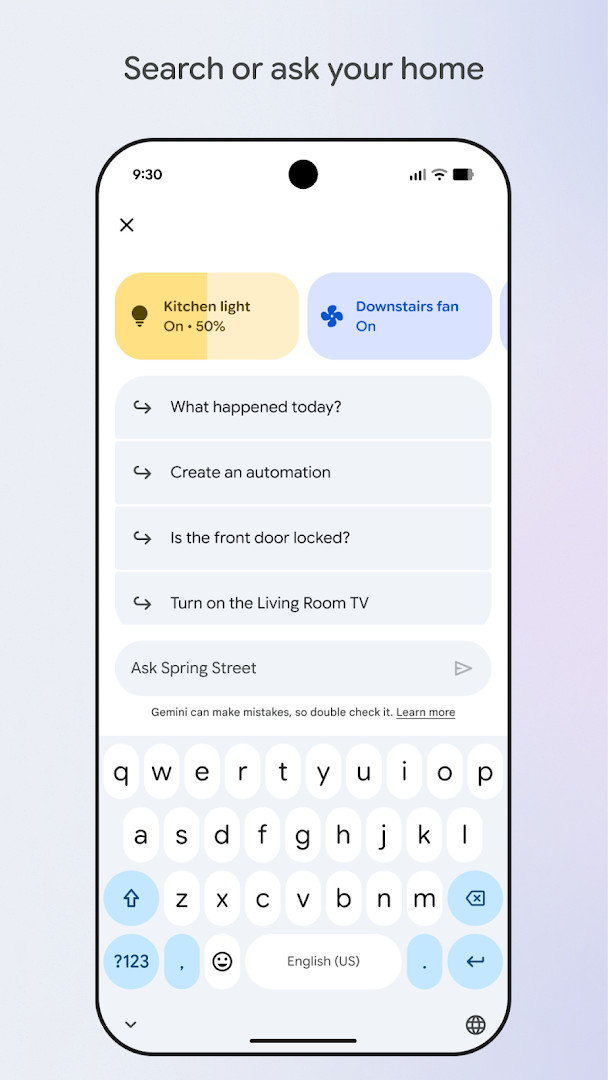
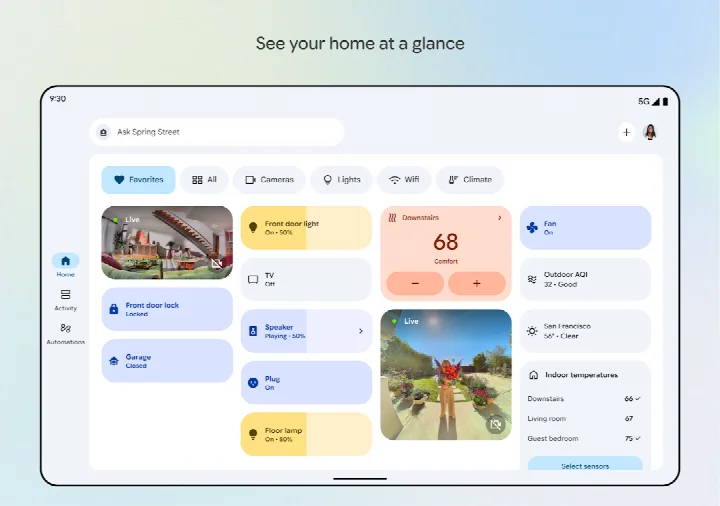
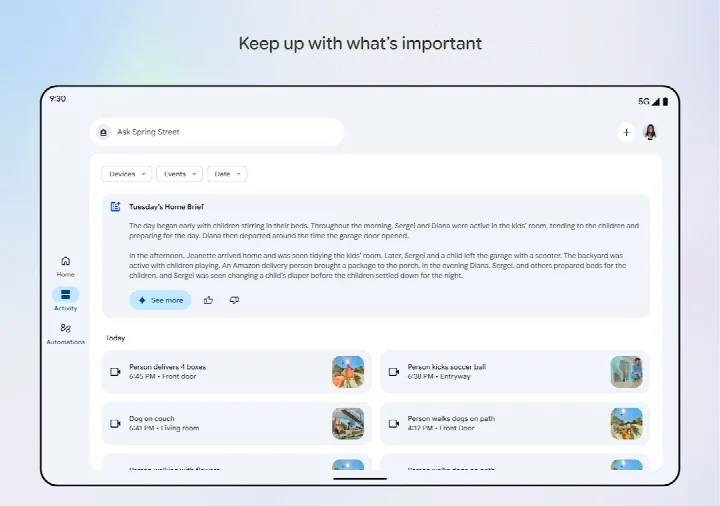
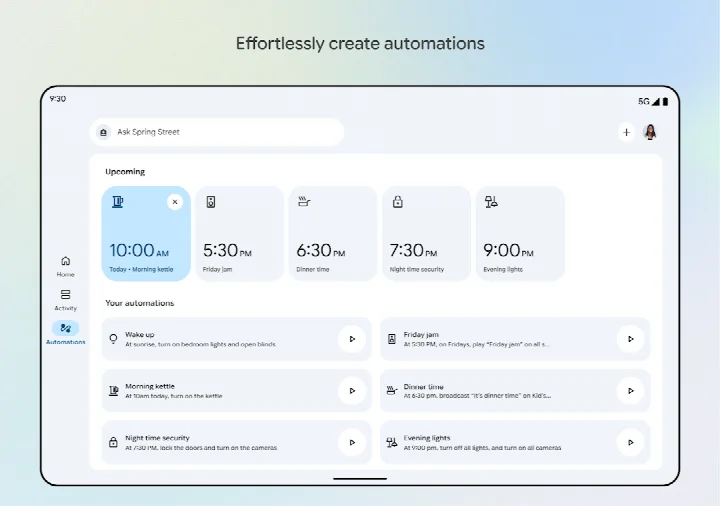
Google Home is a smart-home management application by Google LLC that lets you set up, monitor, and control compatible Nest, Chromecast, and Google Home devices, as well as thousands of third-party smart products. The app addresses the challenge of juggling multiple gadgets and apps by consolidating device setup, live camera feeds, event history, and automation into a single interface. It solves this by providing a dashboard-style home view, streamlined navigation, and natural-language control powered by Gemini for Home, so you can check statuses, review missed events, and issue voice or text commands without hopping between separate utilities.
Key features
- See your home at a glance with a dashboard that shows device status and a recap of recent events you may have missed.
- Group devices into personalized dashboards and navigate settings through an updated, streamlined organization.
- Scan camera events quickly using the live view and history interface to see what happened at a glance.
- Control your home by speaking or typing what you want devices to do, using Gemini for Home natural-language commands.
- Pin frequently used devices, automations, and actions to a Favourites tab for one-tap access when opening the app.
- Set up and manage routines in a dedicated Automations tab, and edit permissions in a consolidated Settings tab.
- Check in on your home from anywhere, including from a Wear OS watch for controlling compatible devices on the go.
- Receive alerts for events like a person or package at your front door, and add a favourites tile to your watch face.
How to install
- Tap the download button on this page to get the APK file (83 MB).
- When prompted, allow your browser or file manager to install apps by enabling the 'Install unknown apps' setting for that source.
- Open the downloaded APK file from your notifications or file manager.
- Tap Install and wait for the installation to complete.
- Open the Google Home app and sign in with your Google account to start setting up devices.
Pros
- Unified control for Nest, Chromecast, and a wide range of compatible smart-home products.
- Natural-language control via Gemini for Home simplifies device management.
- Live camera views and event history make monitoring straightforward.
- Favourites tab and automations support quick, personalized access.
- Free to download with no ads.
Cons
- Requires a broad set of permissions, including identity, contacts, location, phone, storage, camera, microphone, and Wi-Fi information.
- In-app purchases are present, which may unlock additional features or services.
- Some features and products may not be available in all regions, and compatible devices are required.
- Requires Android 8.0 or higher, which may exclude very old devices.
Latest changes
The app's update notes are generic, stating that each release brings new features, improvements, and bug fixes. No specific changes are detailed in the provided information. The latest listed version is 3.4.1.5, dated 2025-09-18, while the app itself was last updated on 2026-11-11. For detailed release notes, the app directs users to a notes page.
Previous versions
| Version | Size | Requires Android | Updated |
|---|---|---|---|
| 3.4.1.5 | 83 MB | 8.0 | Sep 18, 2025 |
This app is best suited for experienced users who already own or plan to buy Google Nest, Chromecast, or other compatible smart-home devices and want a single control center. It appeals to those who manage multiple lights, cameras, thermostats, or doorbells and appreciate the ability to group devices, create automations, and use voice or text commands to adjust settings. Users who value quick camera event review and remote check-ins, including from a Wear OS watch, will find the app practical. It is also appropriate for people comfortable granting extensive permissions, given the app's access to location, microphone, camera, and storage, and who accept that some features are region-dependent.
Before installing, ensure your smart-home devices are compatible with the Google Home ecosystem. After setup, spend time pinning your most-used devices to the Favourites tab and creating routines in the Automations tab to reduce daily taps. For camera monitoring, rely on the live view and event history to catch important moments without scrolling through all footage. If you have a Wear OS watch, add a favourites tile to control lights or thermostats from your wrist.
Permissions
Frequently asked questions
Is Google Home free to install and what Android version does it require?
Yes, Google Home is free to download and use. The app requires Android 8.0 or higher to run smoothly.
What is the file size of the APK?
The app size is listed as 83 MB. You can expect a typical download size around that range depending on device and updates.
Does Google Home need an account to use?
No separate account is required to install the app, but you will need a Google account to set up and control compatible devices.
What permissions does Google Home ask for?
The app requests several permissions, including Identity, Contacts, Location, Phone, Photos/Media/Files, Storage, Camera, Microphone, and Wi-Fi connection information.
How do I update Google Home?
To update to a newer version, download the latest APK from this page and install it over the existing app.
What can I do with Google Home after installing?
After installation, you can manage and control your Nest, Chromecast, and Google Home devices from the app. It supports routines, feeds, and device management.
Google Home delivers a comprehensive, centralized approach to managing a modern smart home, with strong camera integration and natural-language control. It is a solid choice for those already invested in Google-compatible devices, though the permission requirements and regional limitations are worth weighing.
Similar apps
 YouTubeYouTube is a free video app with a size of 199 MB, requires Android 10 or higher, and includes ads and in-app purchases. It offers a vast…Google LLC · ★ 3.8 · Entertainment · 156 MB
 Google GeminiGoogle Gemini is for Android users who want an AI assistant for writing, planning, studying, and creative projects. The app is free to us…Google LLC · ★ 4.5 · Productivity
 Google WalletGoogle Wallet is for Android users who want to pay in stores, online, or in apps and keep passes, tickets, and digital IDs in one place. …Google LLC · ★ 4.3 · Finance · 16 MB
 SmartThingsSmartThings is for Android users who want to control smart TVs, appliances, speakers, and gadgets from brands like Ring, Nest, and Philip…Samsung Electronics Co., Ltd. · ★ 4.6 · Lifestyle · 227 MB
 PinterestPinterest is a free lifestyle app from developer Pinterest that centers on discovering and collecting ideas. It is rated Teen and has dra…Pinterest · ★ 4.2 · Lifestyle
 Tinder: Match & Meet SinglesTinder Dating App: Chat & Date has been installed over 500 million times and holds a user rating of 3.92 based on more than 9.2 million r…Tinder LLC · ★ 4.0 · Lifestyle · v17.43.0
 My VerizonMy Verizon brings account management, bill payment, device controls, and shopping into a single app for Verizon customers. It is free to …Verizon Consumer Group · ★ 4.5 · Lifestyle · v22.3.5
 Bumble Dating App: Meet & DateBumble Dating App: Meet & Date has over 100 million installs and a rating of 3.78 from about 1.64 million ratings. The app requires Andro…Bumble Holding Limited · ★ 3.8 · Lifestyle · v5.492.0
More from this developer
 Google Play servicesGoogle Play services is for Android users who rely on Google apps and other apps that depend on Google's core features. It handles authen…Google LLC · ★ 4.3 · Tools · 266 MB
 Digital WellbeingDigital Wellbeing requires Android 9 or higher and has no ads and no in-app purchases. The app was released on 2018-08-08 and updated on …Google LLC · ★ 3.6 · Tools
 Google MeetGoogle Meet is 118 MB in size and requires Android 8.1 or higher, with no ads and no in-app purchases. It has been installed over 10 bill…Google LLC · ★ 4.4 · Communication · 118 MB
 GmailGmail is for individuals and teams who need secure email, chat, and collaboration in one place. It is free to download, requires Android …Google LLC · ★ 4.1 · Communication · 26 MB
 Speech Recognition & SynthesisSpeech Recognition & Synthesis is 15 MB in size, requires Android 8.0 or higher, and has no ads or in-app purchases. It has been updated …Google LLC · ★ 4.0 · Tools · 15 MB
 Google ChromeGoogle Chrome is a free browser that syncs bookmarks, tabs, and passwords across devices and includes tools like Google Lens and Translat…Google LLC · ★ 4.1 · Communication · 218 MB
Updated: Nov 21, 2026
- Size
- 83 MB
- Requires Android
- 8.0
- Updated
- Nov 20, 2026
- Installs
- 1B+
- Rating
- ★ 3.99 (3,671,933)
- Category
- Lifestyle
- Developer
- Google LLC
- Content rating
- Everyone
- Package
- com.google.android.apps.chromecast.app
- Free
- ✓ · In-app purchases