Android IP Camera: Stream Live Video
Android IP Camera is a free camera app by DigitallyRefined that lets you turn your phone into a network IP camera.

Android IP Camera is a 5 MB free app that requires Android 7.0 or higher. It supports H.264 and MJPEG streaming, plus optional RTSP, ONVIF, and a built-in web interface. The app suits users who want to use an old phone as a home surveillance camera.
Get App · v0.16.1Screenshots
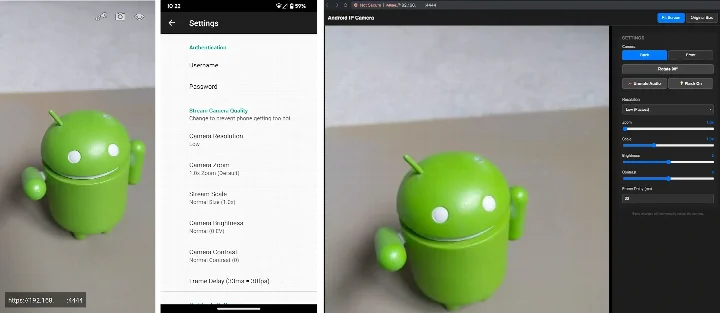
Android IP Camera is a photography and streaming utility by DigitallyRefined that turns a phone into a network-accessible camera server. Instead of relying on cloud relays, the app runs a built-in server on the device, letting you view live video from a web browser, a video player, or compatible home automation platforms. It supports H.264 and MJPEG encoding, with optional RTSP and ONVIF modes for broader integration. Version 0.16.1, released on 2026-11-06, refines the remote web interface and improves TLS certificate handling, making secure connections more reliable. The app is free and open source under the MIT license. Privacy is a central theme: streams are protected by username and password, and automatic TLS certificates encrypt both the video feed and login details over HTTPS or RTSPS. The app also offers an optional start-on-boot feature, though the developer warns that running 24/7 can strain the battery. For those concerned about permissions, the app focuses on local network access and camera use rather than collecting personal data. The interface is deliberately minimal, with controls for resolution, zoom, exposure, contrast, frame rate, and image quality. You can switch between the main and selfie camera, toggle the flash, rotate the image, and even turn off the display while streaming to save power. A remote web interface provides full control from another device, including video recording and audio/video sync adjustments. This makes it a practical tool for home surveillance, DIY projects, or anyone who wants a flexible IP camera without extra hardware. The 5 MB download and Android 7.0 minimum requirement keep it lightweight and accessible.
Key features
- Built-in HTTP server for browser-based viewing
- Optional RTSP stream with H.264 video and AAC audio
- ONVIF mode with WS-Discovery, snapshots, and motion events
- Switch between main and selfie camera
- Remote web interface for camera controls, rotation, recording, and sync
- Adjustable image quality, frame rate, resolution, zoom, exposure, and contrast
- Username and password protection
- Automatic TLS certificate for HTTPS/RTSPS
- Option to turn off display while streaming
- Optional start on boot
How to install
- Tap the download button on this page to get the 5 MB APK file.
- When Android prompts, allow your browser or file manager to install apps from unknown sources (the 'Install unknown apps' setting).
- Open the downloaded APK file from your notifications or Downloads folder.
- Tap Install and wait for the process to complete.
- Open the app from your app drawer and grant camera and network permissions when requested.
Pros
- Strong privacy focus with local-only streaming and encryption
- No cloud account or subscription required
- Flexible integration with RTSP and ONVIF clients
- Lightweight at 5 MB and works on Android 7.0 and up
- Open source under MIT license
Cons
- Running continuously may overheat some phones or damage the battery
- Setup requires some technical knowledge for RTSP or ONVIF
- Display-off streaming may not be available on all devices
Previous versions
| Version | Size | Requires Android | Updated |
|---|---|---|---|
| 0.16.1 | 5 MB | 7.0 | Nov 6, 2026 |
| 0.16.0 | 5 MB | 7.0 | Nov 4, 2026 |
| 0.15.0 | 5 MB | 7.0 | Oct 27, 2026 |
| 0.14.0 | 4.9 MB | 7.0 | Sep 26, 2026 |
| 0.13.1 | 4.9 MB | 7.0 | Sep 19, 2026 |
| 0.13.0 | 4.9 MB | 7.0 | Sep 14, 2026 |
This app suits home users who want a private surveillance camera without cloud services, hobbyists building smart home setups with Frigate or Home Assistant, and tech-savvy individuals needing a quick, portable IP camera for testing or DIY projects.
If you plan to run the camera 24/7, enable your phone's battery charge limit (often capped at 80%) and choose a lower frame rate or image quality to reduce heat generation.
Frequently asked questions
How can I use my phone as a camera in Frigate or Home Assistant?
The app includes a built-in server that exposes an MJPEG stream. In Frigate or Home Assistant, you can add it as an MJPEG IP camera using the address
Does the app support RTSP streaming for NVRs and other clients?
Yes, an optional RTSP stream is available with H.264 video and AAC audio. Clients like mpv, Frigate/go2rtc, and NVRs can connect to rtsps://[ip_address]:8554/live, and a lighter sub stream is available at /live/sub.
Can I integrate the app with UniFi Protect or other NVR systems via ONVIF?
The optional ONVIF camera mode supports WS-Discovery, snapshots, and motion events, making it compatible with UniFi Protect, Home Assistant, and other NVRs.
What controls are available through the remote web interface?
The web interface lets you switch between the main and selfie camera, adjust image rotation, start video recording, control audio/video sync, toggle the flash light, and change resolution, zoom, exposure, and contrast.
Are there features to reduce overheating or battery strain during long use?
You can choose different image quality settings and frame rates to help reduce phone overheating. The developer warns that running at higher quality may cause some phones to overheat, and for 24/7 use you should avoid keeping the battery at 100% charge—enable a charge limit to 80% if your phone supports it.
Android IP Camera delivers a solid, privacy-respecting way to repurpose a phone as a network camera. Its encryption and local-only approach are commendable, though the battery and heat warnings mean it is best used with care. For those comfortable with basic network settings, it offers excellent value and flexibility.
Similar apps
 Samsung GallerySamsung Gallery has a size of 51 MB and requires Android 11 or higher. The app does not charge for its core features, and it does not inc…Samsung Electronics Co., Ltd. · ★ 3.8 · Photography · 51 MB
 GalleryGallery is a free photography app from Google LLC that groups pictures by categories such as People, Selfies, Nature, Animals, Documents,…Google LLC · ★ 4.2 · Photography
 Picsart AI Photo Editor, VideoPicsart AI Photo Editor, Video is free to download and also offers optional in-app purchases, and it carries ads. The app requires Androi…PicsArt, Inc. · ★ 3.9 · Photography · v31.1.6
 AI GalleryAI Gallery has a 166 MB download size and requires Android version 12 or higher. It includes no ads, and the data indicates no in-app pur…Transsion Holdings · ★ 3.5 · Photography · 166 MB
 BeautyPlus-Selfie Photo EditorBeautyPlus-Selfie Photo Editor serves people who want to retouch selfies, edit photos, and enhance videos with AI tools. The app is free …PIXOCIAL TECHNOLOGY (SINGAPORE) PTE. LTD. · ★ 4.5 · Photography · v7.50.0
 FaceApp: Perfect Face EditorFaceApp: Perfect Face Editor has 36 MB size and requires Android 5.0 or higher. It offers over 60 photorealistic filters, includes in-app…FaceApp Technology Ltd · ★ 4.3 · Photography · 36 MB
 Video Editor & Maker - InShotVideo Editor & Maker - InShot combines video editing, a photo editor and a collage maker in one app, with AI captions, speech, background…InShot Video Editor · ★ 4.8 · Photography · v2.250.1556
Updated: Nov 15, 2026
- Version
- 0.16.1
- Size
- 5 MB
- Requires Android
- 7.0
- Updated
- Nov 6, 2026
- Category
- Photography
- Developer
- DigitallyRefined
- Package
- com.github.digitallyrefined.androidipcamera
- Free
- ✓